
Have you heard of Gigwalk, but you’re not sure what it is or how to make money using it? Then keep reading; we’re providing all the details in this Gigwalk review.
Making money with your smartphone has never been easier! With tons of apps that cater to the booming world of side gigs, there are many ways you can turn your smartphone into a personal side hustle.
As a stay-at-home mama who just exited the workforce, earning even a few extra bucks during nap time seemed like an awesome opportunity! After reviewing several money-making app reviews, I decided to join the Gigwalk community.
Here’s everything you need to know about Gigwalk and if it’s the right opportunity for you.
What is Gigwalk?
Gigwalk is a smartphone app that pays you to complete small assignments (also known as “Gigs”) based on your location. Companies seeking Gigwalkers are typically retail stores seeking brand audits or feedback on products and product displays.
Side note: Most Gigs are available in the US and Canada; however, there are occasionally Gigs in countries like India, Germany, France, Australia, and the UK.
How Do You Become a Gigwalker?
Becoming a Gigwalker is extremely simple. Here are the steps:
- Find and download the Gigwalk App on your smartphone; it’s available for both the Apple iPhone and Android devices.
- Easily register your Gigwalk account. All you need to do is answer a couple of questions and provide your email address.
- Connect your PayPal Account. This makes getting paid fast and easy. (I got paid within 32 hours of my first Gig.)
How Does Gigwalk Work?
One of the greatest advantages of Gigwalk is its flexibility. You decide whether to accept the Gig or pass on it for something different.
Another great feature is that you’re not limited to just your hometown. You can use the “search this area” feature on the app to see what’s outside of your general location as well.
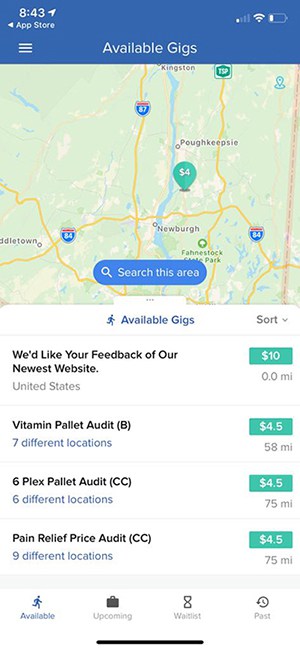
Here’s an overview of how Gigwalk works:
- A Gig is posted in the Gigwalk app and shows up on the map. Each Gig listing includes the payment amount, a short description, and the location. Miles are calculated based on your phone location.
- Look for Gigs in your area that could be a good fit, and apply for those that interest you.
- Apply for a Gig by clicking the “Apply to this Gig” button.
- Occasionally, the business may ask a screener question before you’re accepted, such as, “Explain why you would be a good fit for this Gig.”
- When accepted, you’ll be notified and given instructions for the Gig.
- Upon completing the work, submit it through the Gigwalk app. You may need to answer a few follow-up questions.
- Wait for business approval to get paid, and after approval, payment is sent directly to your PayPal account!
What Types of “Gigs” Will I Do?
This is the fun part. Many of the jobs featured on Gigwalk are posted through retail stores looking to check on displays or products on their shelves. However, they also have online gigs like website testing and surveys.
Essentially, stores want to verify product pricing, availability, and conditions. Some other consumer brands or retailers will have you ensure that marketing events are done correctly and on time. You’ll verify this by taking photos of the products, displays, and events.
My first Gigwalk task was for a big retailer (Kohl’s), and I landed it while taking my kids out for some groceries! I walked around and checked the app to see if anything popped up in our area. The store next to us had a Gig available, so I jumped in and got it!
The Gig asked me to take pictures of a blender display and upload them to the app. All in all, the entire job took me five minutes to complete – even with kids in tow!
How Much Money Can I Make as a Gigwalker?
That very first Gig I landed took me five minutes, and I earned $6. This included the time it took me to locate the product, take pictures, and upload them. Not to mention, I was out and about shopping with my kiddos.
Considering it was fast and convenient, you can imagine how excited I was to earn this extra cash!
Overall, the amount of money you can make varies by location and by Gig. On average, Gigwalkers can earn anywhere from $3-$100 for an individual task.
If you’re looking to complete a substantial number of gigs, the app tends to benefit those who live in larger cities like New York City, Los Angeles, Dallas, San Francisco, and so on. Not only are there more businesses, but you can also rack up extra money without necessarily having to worry about the cost of gas.
When Will I Get Paid for Gigs?
Gigwalk clients are allowed up to 14 days to approve your work before an automated payment goes to your PayPal account.
However, I personally have never waited that long to get paid (at least not yet). Typically, payments are made via PayPal within 24-48 hours.
Gigwalk Tips and Tricks (Plus Benefits)
Some complaints regarding Gigwalk include problems with app connectivity and Gig availability. Here’s what I’ve found as a Gigwalk user:
On Gigwalk App Connectivity Issues
One way to fix some app connectivity issues is simply by allowing the app to locate your device.
I know sometimes individuals get nervous about allowing apps or other devices to “know their location,” which I totally get! But for apps like Gigwalk to work properly, it is one fear (gulp) you’ll have to put aside.
Another piece of advice: If you don’t want the app to know your precise location, you can always access the Gigwalk App while you’re away on vacation.
This way, you can earn some money without revealing your hometown location to the app. Simply turn off the location feature or delete the app before you head home!
 Gig Availability
I can tell you from experience that this can be an issue if you’re searching for Gigs in a more rural location.
On average, I see about 10 Gigs in my area over the course of two or three days. This number will vary depending on your location.
As mentioned earlier, the app does have a “search this area” feature, so you can broaden the hunt for Gigs if it makes sense to do so.
The key is to keep checking the app and widen your search – especially if you’re out of town anyway.
Gigwalk Tips
Here are a few extra tips regarding the Gigwalk app we thought you should know.
Not all Gigs require you to drive. Every now and then, remote Gigs will pop up from companies looking for you to test out their websites.
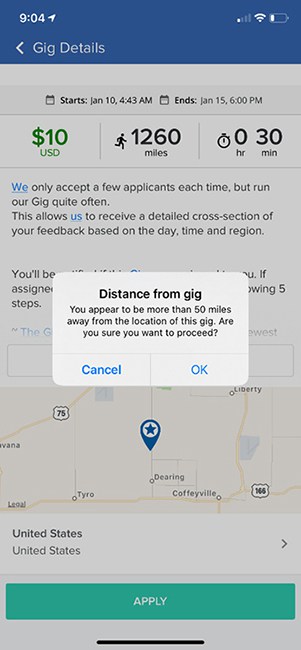
When you attempt to accept Gigs outside of your location, a pop-up will remind you that you’re over a certain number of miles from your area and ask you if you want to proceed.
This great little feature will help to ensure that you’re ready to take on a Gig that may be further away.
If you’re a city dweller, you can maximize the amount of money you make by taking on Gigs within blocks of each other.
Is Gigwalk a Scam?
Gigwalk is a legitimate mobile app with 4.5 stars in the Apple App Store and 3.1 stars in the Google Play Store.
They also have an A+ rating with the Better Business Bureau and a 3-star rating on Trustpilot.
You do need to have realistic expectations when using the app. You won’t earn a full-time income, but it is an easy way to add a little extra cash to your pocket.

Alternatives to the Gigwalk App
Because many Gigs are quick, you can piggyback other side hustles to really cash in.
1. Field Agent
With Field Agent, you can earn $3 to $20 for completing short tasks like photo audits, surveys, reviews, mystery shops, try-and-buy, and scavenger hunts. Just download the mobile app (avilable for both iOS and Android), browse available gigs, and when you find one you would like to complete, reserve it and complete the task. Once your work has been verified, you’ll receive your earnings in cash. Field Agent accepts users from the US, Canada, Mexico, Ecuador, the UK, Spain, South Africa, and Australia.
2. IVueIt
Another mobile phone app to explore is IVueit. With this app, you’ll earn $7 to $75 per task, called Vues, for quick photo inspections. Just download the app, accept an avilable Vue, snap your photos, answer a few questions, and submit your work. Once it’s been approved, you’ll receive your earnings via PayPal.
3. Mobee
With Mobee, you can earn a little extra money completing mystery shops in your city. Just download the app, pick a mission, go to the store, snap your pics, and submit your work. With the points you earn, you can redeem them for gift cards to popular retailers like Starbucks, Amazon, Target, and many others. The Mobee app is available in the US and Canada. Check out this list for more mystery shopping apps.
4. Premise
The Premise app, available in 140 countries, will pay you for completing short tasks such as surveys, gathering and sharing local information, and snapping photos. Simply download the app, avilable for both iOS and Android devices, create your account, and explore tasks. Once you’ve selected and completed a task, you can retrieve your earnings via PayPal, Payoneer, or Bitcoin.
Gigwalk Review Wrapup
The Gigwalk app is a great way to make a little spending money while you’re out and about.
If you live in the city or are visiting, you’ll have more Gigs available. But don’t dismiss the app if you’re in the suburbs or rural areas, either. Other opportunities, such as remote website testing gigs, appear on the app.
Remember, if you’re traveling, take advantage of your time on the road and grab that extra cash with a simple Gig.
Looking for more platforms like Gigwalk? Check out this massive list of smartphone apps that pay in cash!
Have questions or comments about Gigwalk? We would love to hear from you! Drop us a line below to share your experience with the app!